Build your first UI in C#
This route creates one retained control tree with a label, editable field, button event, and status label. The shared view is compiled and smoke-tested against both runtime peers. The first public NuGet preview is not indexed yet, so the current executable route uses this repository's source projects rather than presenting unavailable package commands.
Choose a host
Use the runtime already selected by the game. Forma's MonoGame and FNA APIs are equivalent, but the assemblies are not interchangeable.
# MonoGame
dotnet run --project samples/Forma.QuickStart.MonoGame/Forma.QuickStart.MonoGame.csproj \
  -p:FormaRuntime=MonoGame

# FNA
dotnet run --project samples/Forma.QuickStart.FNA/Forma.QuickStart.FNA.csproj \
  -p:FormaRuntime=FNA
Both hosts use the same QuickStartGame and control-tree source. Each thin executable selects only
its matching framework and Forma project graph.
Create the control tree
The page imports this block from the file compiled by both sample hosts:
// SPDX-License-Identifier: MIT

using Microsoft.Xna.Framework;

namespace Forma.QuickStart;

internal static class QuickStartView
{
    public static VBoxContainer Create()
    {
        var name = new LineEdit
        {
            Name = "Name",
            PlaceholderText = "Your name",
            Text = "Player",
            CustomMinimumSize = new Vector2(320, 44),
        };
        var status = new Label { Text = "Ready." };
        var greet = new Button
        {
            Text = "Greet",
            CustomMinimumSize = new Vector2(120, 44),
        };
        greet.Pressed += (_, _) => status.Text = $"Hello, {name.Text.Trim()}!";

        var root = new VBoxContainer
        {
            Name = "QuickStartRoot",
            Separation = 12,
        };
        root.AddChild(new Label { Text = "Your first Forma UI" });
        root.AddChild(name);
        root.AddChild(greet);
        root.AddChild(status);
        return root;
    }
}
VBoxContainer owns its children and allocates them vertically. CustomMinimumSize prevents the
editable field and button from collapsing below useful input dimensions. Pressed updates the
retained status label directly; a redraw is queued by the changed property.
Connect Forma to the game
QuickStartGame creates a UIContext and adds UIComponent to Game.Components. The component
forwards pointer, keyboard, and text input, updates UIContext.ViewportSize from the graphics-device
viewport, and draws the retained tree. The game keeps a 40-pixel inset and recomputes the root size
each update, so resizing the window reallocates all available content space.
The sample loads Fonts/Inter_Regular.ttf with UIFontFace.FromProjectFile, creates a
DynamicUIFont, and assigns it to UIContext.Theme.FontFamily. A game using SpriteFont instead can
assign Font properties or a SpriteFontAdapter; see Dynamic text for the
ownership and deployment choices.
UIComponent.Dispose disposes its UIContext. The game disposes the application-owned UIFontFace
after the base game and its components have been disposed. Preserve that ownership order when moving
the setup into an existing game.
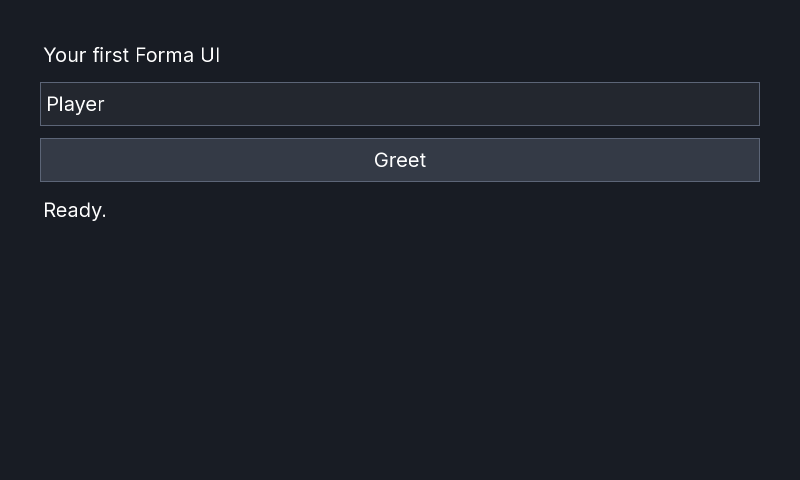
Expected result
MonoGame:
FNA:
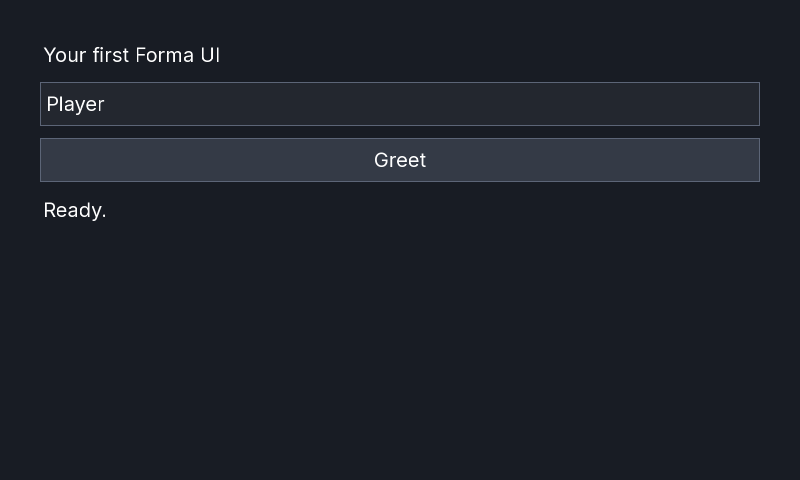
Select the field, enter a name, and press Greet. The status changes to Hello, <name>!.
Validate the fixture
The bounded smoke command restores from an empty package cache, builds the selected peer, renders three frames, saves the backbuffer, verifies the PNG signature, exits, and disposes the game:
FORMA_RUNTIME=MonoGame bash scripts/check-quick-start.sh
FORMA_RUNTIME=FNA bash scripts/check-quick-start.sh
Troubleshooting
- Mixed runtime assemblies: use only
.MonoGamepackages with MonoGame or only.FNApackages with FNA. Cleanbin,obj, and lock files after changing peer. - Missing native assets: FNA package consumers need the matching native-assets distribution. Native font loading also needs the RID assets described in Dynamic text.
- Missing font/content: verify the file is copied beside the executable at
Fonts/Inter_Regular.ttf. A content-pipeline SpriteFont requires its compiled XNB instead. - No graphics device: graphical startup requires a supported desktop session and backend. Linux CI uses software graphics under Xvfb; see Runtime support.
- XAML diagnostics: this C# route does not invoke the XAML compiler. For declarative views, start with the XAML language contract and keep the runtime and build-package peers aligned.